Keurig K300 2.0 Brewing System: Ownership Guide
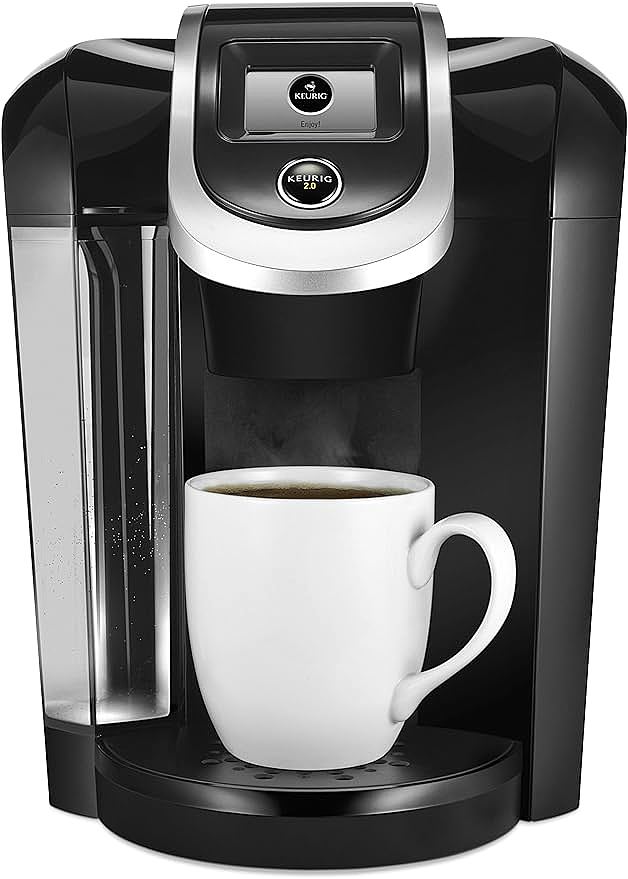
Keurig K300 2.0 Brewing System
A coffee machine sits on a kitchen counter, its touchscreen glowing. The user inserts a pod, lowers the handle, and waits for the familiar click. Then nothing happens. The display shows an alert. After a few seconds of frustration, the machine announces that the pod cannot be recognized. The pod is a known brand. The barcode is printed on the foil. Yet the optical scanner refuses to cooperate. This moment captures why a discontinued single-serve brewer from the early 2010s still generates thousands of troubleshooting queries a year. The technology that makes pod-based brewing convenient is the same technology that creates the questions owners ask. The Keurig K300 2.0 Brewing System illustrates how mechanical simplicity and electronic intelligence interact inside a countertop appliance, and why grasping the underlying principles shapes how you maintain one.
The Engineering Logic Behind a 60-Ounce Tank and a Touchscreen
At its core, a single-serve brewer is a small plumbing system wrapped around an electric heater. The K300 follows this blueprint with a 60-ounce removable reservoir, an on-demand heating chamber, an exit needle assembly, and a 2.4-inch monochrome touch display. The reservoir holds enough water for roughly twelve 5-ounce cups. The heating chamber raises water to a target range of 192 to 200 degrees Fahrenheit on demand, meaning it only fires when a brew cycle starts rather than maintaining a standing hot-water tank.
Pod compatibility is split across two formats. Standard K-Cup pods brew single servings from 4 to 12 ounces. K-Carafe pods, larger and containing more grounds, target four-cup batches served from the included carafe. The carafe itself sits on a warming plate that holds serving temperature for up to two hours after brewing completes.
What separates this generation of Keurig from earlier machines is the Keurig 2.0 platform. The K300 represents the entry tier of that platform, priced at $469.99 at launch. The K350, the direct upgrade at $449.99, added a color touchscreen and finer temperature control. Both machines share the same scanning technology, the same thermal extraction system, and the same pod-handling mechanics. The differences live in the user interface layer and in how much manual override the system exposes.
Customer reception remains instructive. Across more than 3,000 reviews, the machine holds a 4.0 out of 5 star average. Flavor scores highest at 4.2. Cleaning scores lowest at 3.4, with versatility at 3.2. The pattern says that the machine delivers on its primary promise, which is producing a flavorful cup, but asks more of the owner on the maintenance side than the average appliance does.
Why a Barcode Scanner Reads Your Morning Coffee
The optical scanning system is the most misunderstood feature of the Keurig 2.0 platform. Each K-Cup and K-Carafe pod carries a barcode on its foil lid. When the brew lever closes, a small optical sensor reads the barcode and identifies the pod type. The machine then adjusts water volume, target temperature, and contact time based on what it reads.
The original motivation for the scanner was brand protection. By requiring a readable barcode, Keurig could restrict which pods the machine would accept, favoring licensed K-Cup partners over third-party and refillable alternatives. The scanner functions as a hardware-level DRM layer. This is why many refillable pods work inconsistently across the 2.0 lineup. A faded barcode, a misaligned lid, or a dust-smudged scanner lens can all trigger rejection.
The underlying principle extends beyond coffee. Any consumer product that uses physical media to encode machine behavior will fail in two predictable ways: the media degrades, and the reader drifts out of calibration. Both failure modes apply here. Pods stored in humid conditions can develop barcode fade over months. The scanner lens accumulates a thin film of mineral residue from steam and ambient moisture. Periodic cleaning with a lint-free cloth, dry or barely dampened with distilled water, restores reliable reading in most cases.
Extraction Chemistry Inside a 192 to 200 Degree Window
Coffee extraction is a temperature-dependent chemical reaction. Water-soluble compounds in roasted grounds dissolve at different rates depending on heat. Sugars and many aromatic acids extract readily at lower temperatures, around 195 degrees. Bitter tannins and heavier phenolic compounds require more thermal energy to enter solution. The 8-degree window the K300 operates within, 192 to 200 degrees Fahrenheit, sits precisely across this chemistry boundary.
The Strength Control feature operates on the same principle. The Regular setting uses standard contact time and target temperature. The Strong setting extends the brew cycle and pushes toward the upper end of the temperature range. The result is a higher total dissolved solids concentration, which reads on the palate as a heavier, more intense cup. Dark roasts benefit from the lower end of the range because they already contain more soluble bitter compounds. Light roasts often need the higher temperatures to fully develop their flavor.
This is why a brewer with adjustable temperature matters. A machine locked at a single temperature forces the user to compensate through pod selection. A machine with a window lets the user match heat to roast, which is closer to the workflow of manual pour-over brewing, executed at pod-brewing speed.
The Carafe Sensor and Why Placement Matters
The carafe mode introduces a different mechanism. A proximity sensor located on the warming plate detects when the carafe sits in the correct position. When triggered, the machine switches from single-cup parameters to four-cup parameters, adjusting flow rate and total volume accordingly.
The sensor has a limited detection zone. Placement errors account for a large share of carafe-mode failures. A carafe pushed too far forward, too far back, or rotated slightly off-center can sit outside the sensor's effective range. The machine then defaults to single-cup behavior, producing a small amount of coffee into the carafe and leaving the rest of the cycle uncompleted.
The underlying engineering tradeoff is familiar. Proximity sensors that detect over a wider zone cost more and often produce false positives. The K300's narrower sensor keeps the unit cost down and avoids accidental triggering when a coffee mug sits on the plate. The cost lands on the user, who must learn the correct placement through trial and error.
How Mineral Scale Rewrites Your Heating Element's Behavior
Descaling is the most-searched maintenance topic around this machine for a reason. The procedure targets a specific failure mode: mineral scale accumulation on the heating element and internal water passages. Local water supplies carry dissolved calcium and magnesium carbonates. As water heats, these minerals precipitate out and form a chalky layer on metal surfaces. The layer acts as thermal insulation. Water passing through a scaled heating chamber takes longer to reach target temperature, and in extreme cases never reaches it.
The symptoms are predictable and progress over time. Early stage: coffee tastes slightly weaker or cooler than it used to. Mid stage: brew cycles run longer, and the machine makes different noises as the heating element struggles against the insulating layer. Late stage: the machine fails to complete a cycle, displays a descale alert, or in worst cases refuses to brew at all.
The descaling procedure is straightforward. Remove any pod from the chamber. Fill the reservoir with a descaling solution, either a Keurig-approved product or a 1:1 white vinegar and water mixture. Run the brewing cycle without a pod, allowing the solution to fill the internal passages and sit in contact with the heating element for roughly 30 minutes. Repeat the cycle two or three times until the reservoir empties. Then run four to six water-only cycles with fresh water to flush residual descaling solution from the system.
Frequency depends on local water hardness. In areas with soft water, descaling every six months is usually sufficient. In hard-water regions, a three-month interval prevents scale from reaching the threshold where it affects performance. Filtered water extends the interval between descales but does not eliminate the need. No consumer-grade filter removes 100 percent of dissolved minerals.
Barcode Scanning Failures and Touchscreen Drift
Two failure patterns dominate the long-term ownership experience. The first is barcode scanning inconsistency. Pods that worked last month suddenly fail to register. The cause is usually environmental. Steam from the brewing process rises into the scanner housing. Mineral residue from steam deposits on the lens. A cleaning cycle restores normal operation in most cases.
The second is touchscreen responsiveness degradation. Corner and edge sensitivity often declines after two or more years of daily use. The root cause is moisture ingress around the display bezel. The display is sealed at the factory, but the seal is mechanical rather than adhesive-bonded. Steam, spilled coffee, and routine cleaning introduce slow moisture migration into the seal boundary. Once moisture contacts the capacitive sensing layer, response becomes erratic.
Mitigation strategies exist. Avoid spraying cleaner directly onto the display. Use a barely damp cloth rather than a wet one. Power off the machine before cleaning to prevent accidental input. For machines already showing degradation, a careful cleaning of the bezel seam with a cotton swab lightly dampened with isopropyl alcohol can restore some responsiveness. If the issue persists, the display assembly has likely aged past the point of field repair.
Why Keurig K300 Pricing Inverts Between Old and New
A curious pricing pattern shapes the used market for this machine. The K300 launched at $469.99. The K350, its direct replacement, launched at $449.99, twenty dollars lower. The inversion suggests Keurig adjusted its 2.0 lineup strategy as the platform matured, possibly responding to pressure from lower-priced competitors or declining K300 sales as the model aged.
For buyers evaluating the used market, the implication is direct. A used K300 typically sells at a meaningful discount to a used K350, sometimes 30 to 40 percent lower. The trade-off is warranty coverage. Keurig typically supports products for two to three years after official discontinuation, and that window has likely closed for the K300. Replacement parts, including exit needles, internal seals, and heating elements, are increasingly difficult to source.
For current owners, the calculation runs differently. A machine already in service represents a sunk cost. The relevant question is whether continued ownership makes sense relative to replacement. For owners who have maintained their machine through regular descaling and careful cleaning, the K300 can deliver years of additional service. The platform's core engineering has not aged poorly. The optical scanner still reads barcodes reliably when kept clean. The heating system still extracts coffee within its design parameters when descaled on schedule.
What Replaced the K300 and Why Each Alternative Exists
The K300's discontinuation opened a gap between continued user demand and official availability. Several alternatives address different priorities.
The Keurig K-Select targets users who want Keurig convenience without the 2.0 scanning system. Priced between $150 and $200, it costs significantly less than the K300's original retail. The 75-ounce reservoir provides about 25 percent more capacity than the K300's 60-ounce tank, reducing refill frequency. The unit lacks optical scanning, which means it accepts any standard K-Cup pod without barcode validation. The trade-off is loss of K-Carafe compatibility and loss of automatic parameter adjustment based on pod type.
The K350 represents the direct 2.0 successor for users who want the full feature set. The color touchscreen upgrade improves visibility in low-light conditions. Enhanced temperature control provides more manual override within the 192 to 200 degree range. For users who value carafe brewing and automatic pod recognition, the K350 is the most natural successor.
Cuisinart Single Serve models appeal to users moving away from pod-based brewing entirely. Many Cuisinart variants use reusable mesh filters, eliminating ongoing pod costs and reducing environmental waste. Build quality generally exceeds Keurig's plastic construction. The trade-off is a steeper learning curve for manual brewing techniques and loss of K-Cup convenience.
Mr. Coffee Single Serve units address the budget segment. Prices below $50 make the category accessible to users new to single-serve brewing. Coffee quality does not match the K300, but the low initial cost suits secondary locations like offices or guest rooms where convenience outweighs premium flavor.
Reading a Discontinued Product's Continued Search Volume
A discontinued machine with active search volume tells a specific story. The K300 continues to generate queries around descaling procedures, troubleshooting, and parts replacement years after official discontinuation. The pattern reveals the gap between product lifecycles and ownership lifecycles. Manufacturers measure lifecycle in units shipped and revenue captured. Owners measure lifecycle in years of daily use, often extending well beyond the manufacturer's support window.
This article exists because of that gap. The K300 will continue operating in kitchens for years. Its owners will continue encountering scale buildup, scanner failures, and touchscreen drift. The engineering principles behind those failure modes, thermal insulation by mineral deposits, optical sensor contamination, capacitive seal degradation, do not change with the product's official status. Understanding the principles turns maintenance from a memorized checklist into a diagnostic skill.
The broader lesson applies beyond coffee. Any appliance that combines water, heat, electronics, and consumable media will develop predictable failure patterns. Knowing the pattern lets the owner intervene before the failure becomes a replacement trigger. Knowing the underlying principle lets the owner adapt the intervention to specific local conditions, water hardness, ambient humidity, usage frequency.
A pod-based brewer looks like a simple appliance. It is not. It is a small chemical reactor with an optical authentication system, a capacitive user interface, and a thermal management loop. Each subsystem ages on its own timeline. The owner's task is to keep them in balance. The K300 2.0 makes that task visible because each subsystem lives in an accessible form factor, in a price range where the user is likely to attempt the maintenance themselves rather than replace the unit at the first sign of trouble.
That visibility is the real value of a discontinued machine still in active service. It teaches the owner something about the engineering category that a newer, more polished machine would hide behind sealed assemblies and proprietary service channels. The K300 is, in that sense, an educational artifact disguised as a coffee maker.
Keurig K300 2.0 Brewing System
Related Essays
Keurig K300 2.0 Brewing System: Ownership Guide
Keurig K300 2.0 Brewing System: Complete Guide and Troubleshooting
